🏛 Office leaders
Reports for LPA / ITA (office leaders)
What you get #
Every Space with Plaazaa Report has a ready LPA / ITA summary for each fiscal year (1 October – 30 September, Thai year). Open it from the 📊 LPA / ITA summary button in the Space's post box, or from the reports board. Managers and staff can open it.
The report is in Thai, the way the assessors read it, and has four parts:
| Part | Matches | What is in it |
|---|---|---|
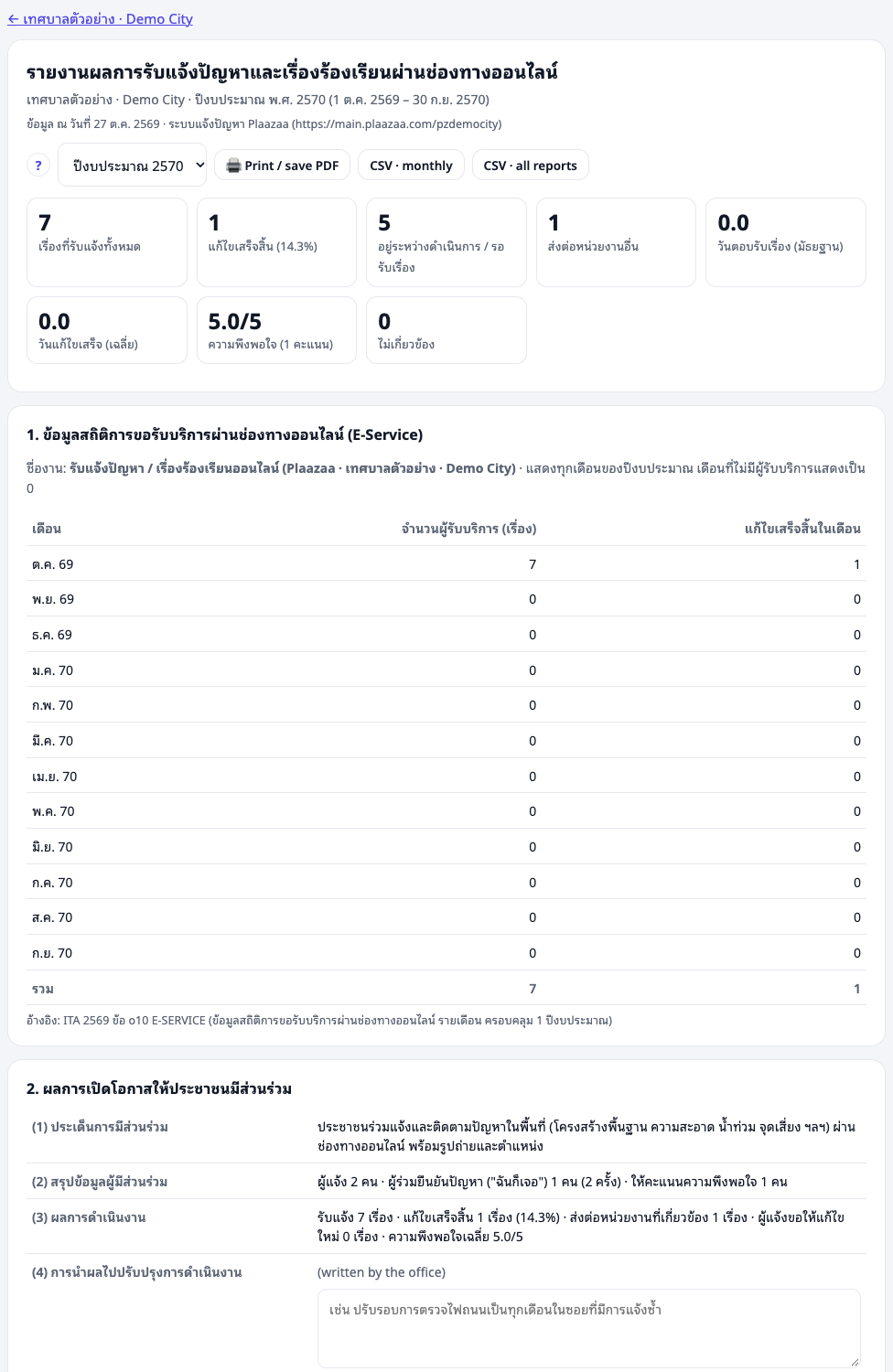
| 1 Online service statistics | ITA o10 E-SERVICE | service name and number of users per month for the whole fiscal year — no blank months |
| 2 Participation | ITA o19 | (1) topic (2) participants (3) results (4) how the results improved the work |
| 3 By category and department | office management | received, done, open, average days to fix |
| 4 Evidence | LPA area 4, indicators 30 and 33 | road, sidewalk, street light and danger-spot reports with before / after photos |
ITA o10: monthly statistics #
Part 1 counts the people who used the online service each month, October to September. Months with no reports show 0, so the table always has 12 months, as ITA asks. Download it as CSV (monthly) to attach as a spreadsheet.
ITA o19: participation #
Points (1)–(3) are filled in automatically: the topic, how many residents took part (reporters, "me too" people, ratings) and the results (done, forwarded, reopened, satisfaction).
Point (4) — how the results improved the work — must be written by the office. A manager types it in the box and presses Save. It is saved for that fiscal year. Example: "Street-light reports showed one area failing often; the office changed to monthly checks."
LPA indicators 30 and 33: evidence #
Part 4 lists reports about roads, sidewalks, electricity / street lights and danger spots, with before and after photos. This is evidence for:
- indicator 30 — repairs with before / after photos;
- indicator 33 — complaints about public lighting and danger spots, and how they were handled.
Good after photos make good evidence: ask staff to shoot from the same place and angle.
Print, PDF and CSV #
- Print / save PDF — prints on A4 with page breaks; choose "Save as PDF" to attach the file.
- CSV — monthly (part 1) or all reports (one row per report, no names). Opens in Excel with Thai text.
Publish for the office website #
ITA checks what the office shows on its own website. A manager can press Publish: anyone with the link can then view the report — no names are shown anywhere. Put the link on the office website (for example under ITA o10 / o19). Press Stop publishing to make it private again.

Limits #
- The report counts reports made in Plaazaa. Complaints by phone or letter are not in it unless staff record them here.
- Deleted reports are left out. "Not relevant" reports are shown separately.
- Staff-only reports are counted, but their details and photos never appear.
- ITA o16–o18 (corruption complaints) need a channel separate from general complaints. This tool is the general channel and does not claim those items.
Questions #
Which fiscal year is shown? The current one. Choose another year from the list at the top.
Can residents see the report? Only if a manager publishes it. Members see the reports board, which has no names.
Who wrote point (4)? A manager of the Space. It is saved per fiscal year and can be edited.