🌐 Esta página aún no está traducida — se muestra en inglés.
🏘 Registro de comercios locales
Local shops — how a shop gets listed, and the rules
What it is #
Local shops is a list of the real shops, cafés, salons and clinics in a town, inside that town's Space: a card on the town's Home and a Local shops tab with search, filters (Open now, category, Near me) and a map. It is built for every city-type Space, not for one town. A town that has no listed shop shows neither the card nor the tab.
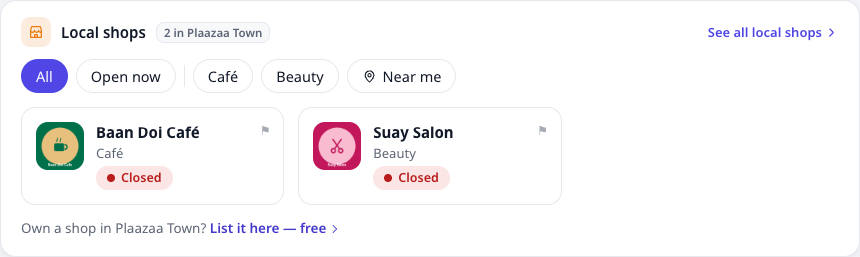
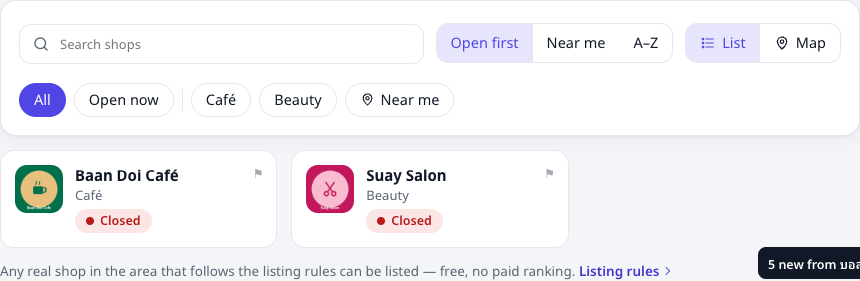
- Free. Listing a shop costs nothing.
- No paid ranking. Shops are shown open-now first, then A–Z. Near me sorts by distance in your own browser — your position is never sent to us, and nothing asks for it until you press Near me.
- Fair. Any real shop in the town's area that follows the rules below can be listed. The town office does not choose or approve shops; it can only report abuse. Plaazaa staff check every request against the same rules.
The listing rules #
A shop is listed when all of these are true:
- It is a real shop — a place with a real name and address that customers can visit, or a service with a real base in the area.
- It is in the town's area — the address and map pin are inside the area the town's Space covers.
- It owns its Space — the person asking is the owner or an admin of the shop's own Business Space.
- The details are true and kept up to date — name, category, address, map pin, opening hours, phone. Offers must be real.
- Lawful and respectful — lawful goods and services only; no misleading claims, no copied or fake reviews, nothing adult, no weapons, drugs or gambling.
- One listing per physical shop.
Plaazaa staff may remove a listing that breaks these rules (for example a closed shop, a wrong address or a misleading offer). The owner is told why, and can fix it and ask again.
💡 Being listed is not an endorsement by the town office or by Plaazaa. It only means the shop passed the checks above.
How to get listed #
- Your shop needs a Business Space (ask Plaazaa to set your Space's type to Business). Menu / Services work in every Business Space, with or without a town.
- Fill in ⋯ Manage → Business info: category, address, map position, opening hours, contact.
- Open ⋯ Manage → Local shops, choose the town, tick that the shop is real and in the area and that you accept these rules, and press Ask to be listed.
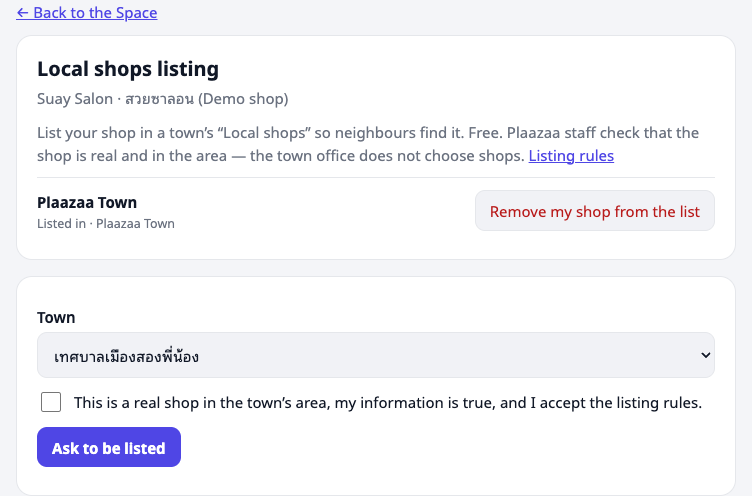
- Plaazaa staff check it and decide. You get one notification: listed, or not listed with the reason. If it is not listed, fix what was wrong and ask again.
- You can remove your shop from the list at any time on the same page.
For town offices #
You do not approve shops and you do not pick which shops appear. On the Local shops tab, a town manager sees a ⚑ on each shop: use it to report a listing that breaks the rules. Plaazaa staff review the report and decide. Everything else about shops is the shop's own business.
For Plaazaa staff #
Site admins open Local shops → staff queue (a link on the Local shops tab). For each request check the rules above, then Approve, or Decline with a reason (not a real shop · outside the area · details missing or wrong · breaks the rules · other) and an optional note. Abuse reports and listed shops are on the same page, where a listing can be removed with a reason. The same rules apply to every shop.